Summer moves fast. One week you are planning a beach trip, and the next week it is August and you cannot remember where it went. A lot of that disappearing time is not spent at your desk or on the job site. It is spent staring at a phone.
Most people have a rough idea that they are on their phone too much. Fewer people have actually looked at the number. And almost nobody has done anything with that number once they saw it.
This is not a lecture about putting your phone away forever. Phones are useful. They are how you get work done, stay in touch with your family, and figure out where to eat dinner on a Friday night. The goal here is smaller and more useful than a digital detox: check your screen time, understand what it is telling you, and make one or two changes that give you back real hours this summer.
How to Check Your Screen Time on Any Device
If you have never looked at this number, it takes about thirty seconds to find.
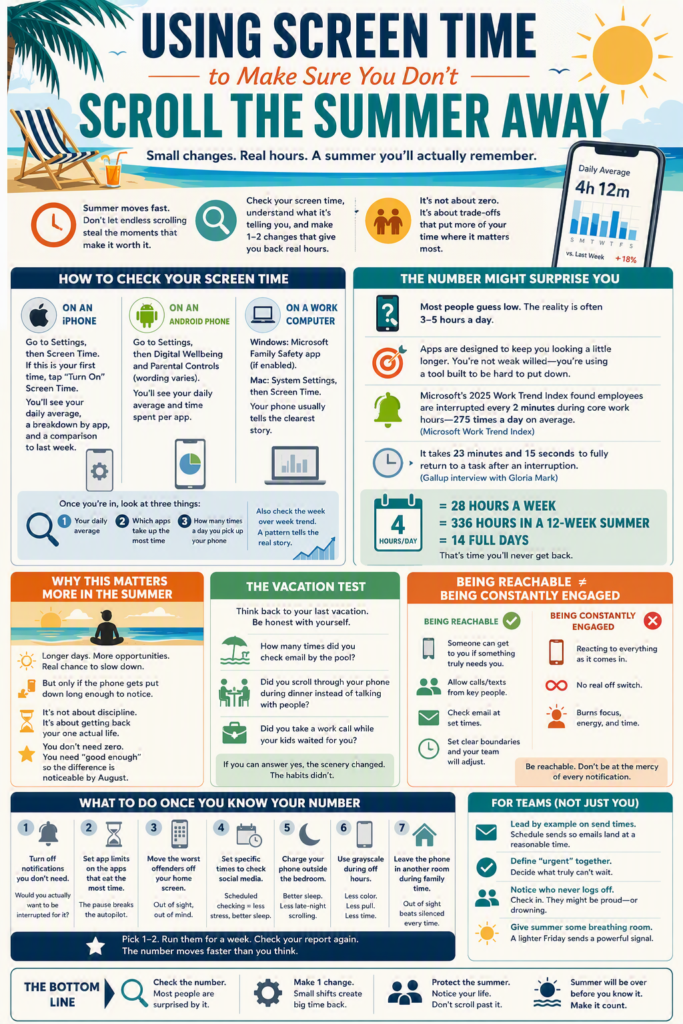
On an iPhone: Go to Settings, then Screen Time. If this is your first time opening it, tap “Turn On Screen Time.” You will see a daily average, a breakdown by app, and a comparison to last week.
On an Android phone: Go to Settings, then Digital Wellbeing and Parental Controls (the exact wording varies slightly by phone maker). You will see a dashboard with your daily average and time spent per app.
On a work computer: Windows has a built in Screen Time report inside the Microsoft Family Safety app if it is enabled, and Mac users can find it under System Settings, then Screen Time. Most people get a clearer picture from their phone, since that is where casual scrolling happens, but if a lot of your day is spent on a work laptop outside of actual work software, it is worth a look too.
Once you are in, look at three things: your daily average, which apps take up the most time, and how many times a day you pick up your phone. That third number tends to be the most surprising one.
Most phones will also show you a week over week trend line. Look at that too. A single day can be an outlier. A number that has been climbing steadily for a month tells you something real about a habit that has quietly taken over more of your day than it used to.
The Number on Your Screen Time Report Might Surprise You
Most people guess low. They think they are checking their phone here and there throughout the day, maybe an hour or two total. Then they open the report and the number is closer to four hours.
That gap between what you think you are doing and what you are actually doing is not a personal failing. It is by design. Every app on your phone is built by a team of people whose job is to keep you looking at it a little longer. You are not weak willed. You are using a tool that was engineered to be hard to put down.
Modern work has made this worse. Microsoft’s 2025 Work Trend Index found that employees are interrupted roughly every two minutes during core work hours, adding up to 275 interruptions across a single day, mostly from meetings, email, and chat notifications Microsoft Work Trend Index. Every one of those interruptions is a small invitation to pick up your phone and check something else while you are at it.
And the cost of picking it up is bigger than the few seconds it feels like. Long running research out of UC Irvine, led by professor Gloria Mark, found that it takes an average of 23 minutes and 15 seconds to fully return to a task after an interruption Gallup interview with Gloria Mark. Check your phone during a project, and you are not losing thirty seconds. You are losing the better part of half an hour of real focus.
Why This Matters More in the Summer
During the school year or the busy season, there is an unspoken permission to be tied to your phone all the time. Everyone is heads down, everyone is stressed, and nobody questions why you are checking email at 9 p.m.
Summer is different. Kids are out of school. Evenings are longer. There is an actual chance to sit on a porch, take a walk before it gets too hot, or watch a ballgame without narrating the score to your phone the whole time. But that chance only turns into something real if the phone gets put down long enough to notice it.
This is the piece that gets missed in most productivity advice: cutting screen time is not really about being more disciplined. It is about getting back hours of your one actual life that you will not get back later. Four hours a day on a phone is twenty eight hours a week. Over a twelve week summer, that is 336 hours, or fourteen full days, spent looking at a five inch screen instead of the things that made summer feel like summer when you were a kid.
You do not need to get that number to zero. You need to get it down enough that the difference is noticeable by August.
The Vacation Test
Here is a simple way to see how much your phone has taken over: think back to your last vacation. Not the version you would describe if someone asked how it went. The actual version.
How many times did you check email by the pool? Did you find yourself scrolling through your phone during dinner instead of talking to the people at the table? Did you take a phone call from work while your kids waited for you to finish so the day could actually start?
Most people can answer these questions honestly and know right away that the vacation did not fully happen, even though they were technically there. The scenery changed. The habits did not.
This is not about guilt. Plenty of jobs genuinely require some connectivity, and plenty of people feel real pressure, spoken or not, to stay reachable even on time off. But it is worth naming clearly, because a vacation that still runs at the pace of a regular week is not doing what a vacation is supposed to do. If you are going to take the time off, or give your team the time off, it is worth protecting it enough that it actually functions as rest.
But I Need to Be Reachable for Work
This is the objection that comes up first, every time. And it is worth taking seriously, because for a lot of people it is true. You might genuinely need to answer client emails on vacation, or be the person who gets called if a job site has a problem, or keep an eye on things while someone else covers for you.
Here is the distinction that matters: being reachable and being constantly engaged are not the same thing. Being reachable means someone can get to you if something truly needs you. Being constantly engaged means you are scrolling through everything as it comes in, work related or not, all day and into the evening, whether or not anything actually needs your attention.
Most phones let you build the first without the second. You can allow calls and texts from specific people to come through even when your phone is otherwise set to do not disturb. You can check email once at a set time in the evening instead of every time it buzzes. You can tell your team, plainly, that you are reachable for anything urgent but not glued to your inbox after 6 p.m., and most teams adjust to that faster than you would expect.
The businesses and families that get real relief from this do not eliminate reachability. They get specific about what actually requires it, and they let everything else wait.
What to Do Once You Know Your Number
Looking at the report is step one. Most people stop there. Here is what actually moves the number.
Turn off notifications you do not need. Go through your notification settings and ask, for each app, would I actually want to be interrupted for this right now? Social media, games, and most shopping apps almost never pass that test. Leave notifications on for texts, calls, and anything work related that genuinely needs a fast response.
Set app limits on the apps that eat the most time. Both iPhone and Android let you set a daily time limit on specific apps. Once you hit the limit, the app is not deleted, it just asks you to confirm you want to keep going. That tiny pause is often enough to break the automatic reach for the phone.
Move the worst offenders off your home screen. This sounds too simple to work, but it works. If opening an app takes an extra swipe and a search, you open it a lot less than if it is sitting right there every time you unlock your phone.
Set specific times to check social media instead of leaving it open all day. Research on digital habits consistently shows that scheduled checking, rather than constant availability, produces better sleep and lower stress with no real loss of connection to what is happening online. Pick two or three windows a day and stick to them.
Charge your phone outside the bedroom. This one change affects both screen time and sleep quality, since the phone that is not next to your bed is the phone you are not scrolling through at midnight or reaching for the second you wake up.
Turn your screen to grayscale during off hours. Most phones let you schedule this automatically in the evening. Apps are designed around bright colors and motion to hold your attention. A grayscale screen is noticeably less interesting to look at, and a lot of people find they put the phone down faster without even thinking about it.
Leave the phone in another room during family time. Not silenced on the table next to you, actually in another room. Studies on this are consistent: the mere presence of a phone on the table, even face down and silent, measurably reduces how present people feel in a conversation. Out of sight solves that in a way that silencing never quite does.
You do not have to do all seven of these. Pick one or two, run them for a week, and check your screen time report again. The number moves faster than most people expect once even one habit changes.
How to stay focused when working from home
What This Looks Like for a Team, Not Just a Person
If you manage people, this is worth thinking about beyond your own phone. A team that feels permission to actually disconnect in the evening and on weekends comes back sharper. A team that feels like it always needs to be reachable burns out by September, right when back to school season adds a new layer of stress on top of an already tired workforce.
You cannot force anyone to change their screen time habits, and you should not try. But you can control the signals your company sends. Do people get emails from leadership at 10 p.m.? Is there an unspoken expectation that a Teams message gets answered within minutes, any time of day? Small structural choices, like agreeing internally that non-urgent messages wait until morning, do more to protect a team’s actual downtime than any wellness newsletter.
A few things worth trying at the company level this summer:
Lead by example on send times. If you write an email at 9 p.m. because that is when you had a free minute, use the schedule send feature so it lands at 8 a.m. instead. Your team reads timing as expectation, whether you mean it that way or not.
Ask what “urgent” actually means for your business. Most companies never define this out loud. Everyone assumes urgent means whatever came in most recently. A short conversation about what genuinely cannot wait, versus what feels urgent but can hold until tomorrow, changes how people treat their phones after hours.
Notice who never seems to log off. Sometimes that person is proud of it. Sometimes they are drowning and do not know how to say so. Either way, it is worth a direct conversation rather than treating it as a sign of dedication to celebrate.
Give the summer schedule some room to breathe. If your business has any flexibility in the summer months, a slightly lighter Friday or an earlier Friday afternoon send everyone the message that the company values downtime, not just performative mentions of it.
Where the Right Technology Setup Helps
None of this requires new software or a big initiative. It mostly requires awareness and a few small settings changes. But there is a version of this that technology gets wrong for a lot of growing businesses, and it is worth naming.
Some companies unintentionally build a culture of constant availability into their tech stack itself. Notifications are turned on by default for everything. Systems are not set up to distinguish between an urgent alert and a routine update. Employees do not know they have options like scheduled sends or working hours settings because nobody ever walked them through it.
Part of what we do at STG is help growing businesses set up Microsoft 365 and their broader technology environment in a way that respects people’s time instead of demanding all of it. That can mean configuring notification settings across a company, setting up working hours defaults in Outlook so emails hold until morning, or simply making sure your team knows the tools they already have. None of it is complicated. It just has to be someone’s job to think about, and for a lot of businesses, that job falls through the cracks.
The Bottom Line
Check the number. Most people are surprised by it. Pick one change from the list above and give it a week. Encourage your team to do the same, and think about whether your company’s own habits are quietly working against everyone’s downtime.
None of this requires a big announcement or a formal policy. It starts with one person looking at one report and deciding that four hours a day of scrolling is not actually how they want to spend a summer they will not get back. Habits like this tend to spread through a team on their own once a few people start talking about it out loud.
Summer will be over before you know it either way. The only question is whether you spent it noticing your life or scrolling past it.
If you want help setting up your technology so it respects your team’s time instead of eating into it, we would love to talk.