
You earned the vacation. You booked the house. You packed the car. And then somewhere between the lake and the second margarita, your phone buzzed with a Slack notification, then two emails, then a Teams call you “probably should take.” By the third day you were answering tickets from a beach chair and telling your family “just one more minute” for the fifth time.
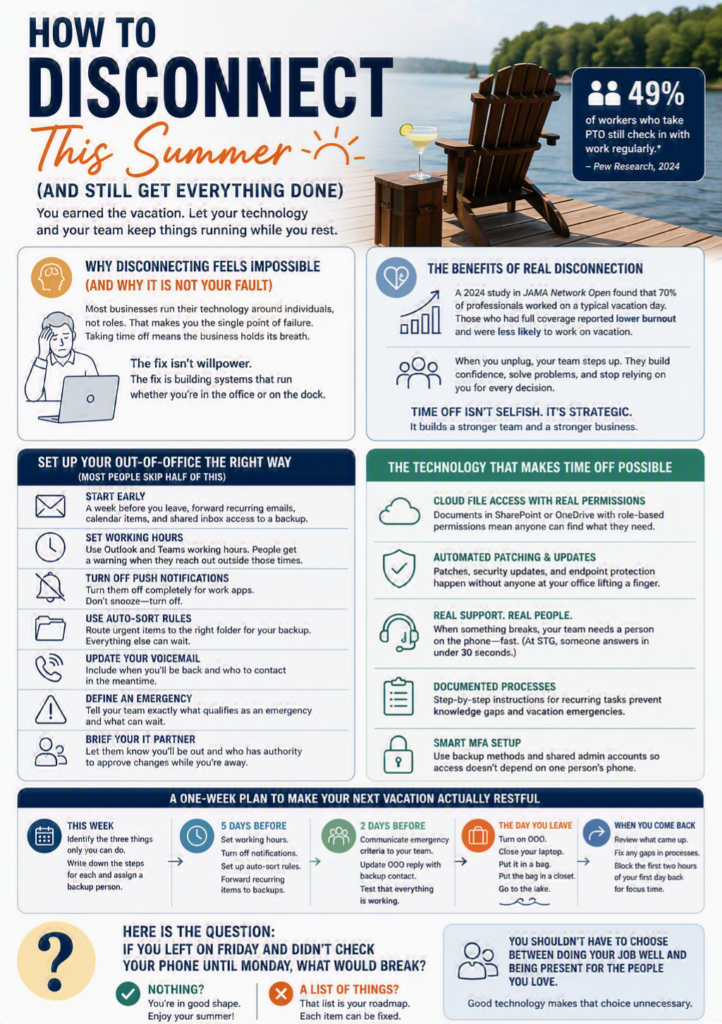
Sound familiar? You are not alone. A 2024 Pew Research study found that 49% of workers who take PTO still check in with work regularly. And the ones in leadership roles do it more, not less. COOs and office managers are especially guilty because they hold the operational keys. When something breaks, the call comes to them.
Here is the thing nobody talks about: how to disconnect this summer is an IT problem. Not a willpower problem. If your technology is set up correctly, you should be able to close your laptop on a Friday afternoon and not think about work until Monday morning. Or take a full week off and come back to an inbox that handled itself.
That is what good IT actually does. It keeps the lights on without you standing next to the switch.
This post is a practical guide. We are going to walk through the technology settings, the process changes, and the mindset shifts that make real time off possible for the people who run growing businesses. Not theory. Steps you can take this week before your next vacation starts.
Why Disconnecting Feels Impossible (And Why It Is Not Your Fault)
Most growing businesses run their technology the same way they ran it when they had 15 employees. The tools scaled, sort of. The permissions got messy. The documentation never happened. And the person who “knows how everything works” became the single point of failure for every process.
If that person is you, taking time off means the business holds its breath until you get back.
This is not a character flaw. It is a system design problem. When technology is configured around individuals instead of roles, every absence creates a gap. The accounting firm in Franklin that panics when the office manager takes a week off is not short-staffed. It is under-documented. The construction company in Huntsville where the project manager is the only one who knows the file structure is not disorganized. It just never had reason to fix the structure until someone tried to take PTO.
The fix is not “try harder to unplug.” The fix is building an IT environment where unplugging does not create risk.
Set Up Your Out-Of-Office The Right Way (Most People Skip Half Of This)
Everyone knows how to turn on an out-of-office reply. Fewer people know how to set one up that actually protects their time. Here is what a real out-of-office setup looks like when you want to come back to a clean inbox instead of a disaster.
Start a week before you leave. Forward recurring items to a backup person. And I do not mean a casual “hey, can you cover me?” Actually redirect the emails, the calendar invites, and the shared inbox access so they land in front of the right person automatically.
Set your working hours in Outlook and Teams. This is the most underused feature in Microsoft 365, and it takes about 90 seconds. When your working hours are set, anyone who tries to schedule a meeting outside them gets a warning. Anyone who sends you a message after hours sees that you are not available. It is a small boundary that compounds over time.
Turn off push notifications on your phone for work apps. Not snooze. Off. The difference matters. A snoozed notification still fires when the timer expires, and by then you have already thought about it. Turning notifications off entirely means you check work on your schedule, not your phone’s.
Set up rules in Outlook to auto-sort while you are gone. If you know certain senders or subject lines need immediate attention, route them to a specific folder that your backup person checks. Everything else can wait. When you come back, you are looking at a prioritized inbox instead of 400 unread messages in chronological order.
Update your voicemail before you go. Your cell phone voicemail should say when you will be back and who to contact in the meantime. This sounds obvious, but most people skip it. A client who calls you directly, gets no answer, and has no alternative number will either panic or start shopping for someone who picks up. Give them a path forward that does not require you.
Tell your team in plain language what qualifies as an emergency. Not “reach out if you need anything.” That is an invitation for everyone to reach out about everything. Instead: “Call my cell if the server goes down or a client threatens to leave. Everything else can wait until July 14.” Specificity protects your vacation. Vague availability invitations destroy it.
Brief your IT partner or support contact. If you work with an outside technology partner, let them know you will be out and who on your team has authority to approve changes while you are gone. This matters for anything involving security, account access, or vendor renewals that happen to fall during your time off. A five-minute heads-up call before you leave prevents a week of confusion while you are gone.
The Technology That Makes Time Off Possible
There is a difference between technology that works and technology that works without you. The first kind keeps going as long as someone is steering. The second kind runs on its own.
Here is what the second kind looks like in practice.
Cloud-based file access with real permissions. When your documents live in SharePoint or OneDrive with role-based permissions already set, anyone on the team can find what they need without calling you. No more “where’s the client folder?” texts at 9 PM.
Automated patching and updates. If your IT partner is handling patches, security updates, and endpoint protection without anyone at your office lifting a finger, that is one less thing that can go wrong while you are gone. If those updates still require someone on your team to approve or restart machines manually, that is a system built around a person, not a process.
A real support number that someone answers. This is the simplest test of whether your IT setup supports disconnecting: if something breaks while you are on the lake, does your team know who to call? Do they actually get a person when they call? Or do they get a ticket portal and a 24-hour response window?
At STG, someone answers the phone in under 30 seconds. That is not a stat we throw around to sound good. It is the reason your office manager can actually take a vacation. When the team knows they can pick up the phone and get help right now, they stop texting the boss.
Documented processes that do not live in someone’s head. If your onboarding process, your client file structure, your monthly close workflow, or your reporting cadence only exists in one person’s memory, every vacation that person takes is a risk event. Good IT includes documentation. Not a 200-page manual nobody reads. Just enough written process that any competent person can follow the steps without calling someone on the beach.
We see this constantly with new clients. The company runs fine as long as certain people are in the building. But the moment someone takes a week off or, worse, leaves the company, the knowledge gap becomes a crisis. The fix is not complicated. A shared OneNote or SharePoint folder with step-by-step instructions for recurring tasks covers 90% of it. The hard part is carving out the two hours to write it down.
Multi-factor authentication that does not depend on one phone. This one catches people off guard. If your MFA is tied to the owner’s personal cell phone, and the owner is out of service range at a cabin in Gatlinburg, and someone needs to approve a login, the whole chain stops. Good MFA setup includes backup methods, shared admin accounts where appropriate, and a clear escalation path that does not require the person on vacation to find a cell signal.
How To Disconnect This Summer Without The Guilt
There is a real psychological component to this. Leaders feel guilty disconnecting because they believe their value comes from being available. And in a lot of cases, the company has reinforced that belief. The COO who answers emails at midnight gets praised for being dedicated. The office manager who never takes a full week off is called “the backbone of the company.”
But availability is not the same as value. And being the only person who can keep things running is not a strength. It is a bottleneck.
A 2024 study published in JAMA Network Open looked at over 3,000 US professionals and found that 70% worked on a typical vacation day. Those who worked during vacation reported higher rates of burnout. The professionals who had full coverage of their responsibilities while they were out reported lower burnout and were less likely to work on vacation in the first place. The takeaway is not complicated: when the systems around you can handle your absence, you actually rest. When they cannot, you just work from a worse location.
There is also a team dynamic that leaders underestimate. When the boss is always available, the team never develops the muscle to handle things independently. Every small decision gets escalated because it can be. Remove that option for a week and people figure it out. They call the IT support line instead of texting the owner. They check the shared document instead of asking where the file is. They solve the problem themselves and feel good about it.
If you take a week off and the business falls apart, that is not proof that you are important. It is proof that the systems around you are fragile. The goal is to build something that runs smoothly whether you are in the office or on a dock somewhere in Gulf Shores.
The best leaders we work with treat their own PTO as a stress test. If I leave for a week, what breaks? Whatever breaks is what we fix next. That is how you build a company that can grow past any one person. Learning how to disconnect this summer is not selfish. It is the first step toward building a business that does not need you in the room to function.
A One-Week Plan To Make Your Next Vacation Actually Restful
If your vacation is coming up in the next few weeks, here is a practical checklist you can start today.
This week: Identify the three things that only you can do. Write down the steps for each one in a shared document. Assign a backup person for each.
Five days before you leave: Set your working hours in Outlook. Turn off push notifications for work apps. Set up your auto-sort rules. Forward any recurring calendar items to backups.
Two days before you leave: Send a message to your team with specific emergency criteria. “Call my cell if X, Y, or Z. Everything else goes to [backup person].” Put the backup person’s name in your out-of-office reply.
The day you leave: Turn on out-of-office. Close your laptop. Put it in a bag. Put the bag in a closet. Go to the lake.
When you come back: Review what came up while you were gone. If anything required you specifically, add it to the list of things that need process documentation. If nothing required you, congratulations. You just proved your team and your technology can handle it.
One more thing for the first day back: Block the first two hours of your return day as focus time. Do not schedule meetings. Do not accept walk-ins. Use that time to read through what happened, close the loop on anything that drifted, and reset your own head. Coming back to a full calendar on day one erases the benefit of the time off. Protect the re-entry the same way you protected the departure.
The Bigger Picture: IT That Serves Your Life And Your Business
We talk to business leaders every week who are running companies that have doubled or tripled in size over the past few years. Their revenue is up. Their headcount is up. Their stress is also up, because the technology that worked at 30 employees is groaning at 80.
The conversation usually starts with something technical. We need better security. We need faster onboarding. We need to get off this old server. But underneath the technical request is almost always a human one: I want to stop worrying about this stuff. I want my team to have what they need. I want to take a vacation without checking my phone every 20 minutes.
That is what we mean by “people first.” Your technology should support the life you want to live and the business you are running. If your IT setup requires you to be always on, always available, always the person who knows where everything is, then the setup is working against you.
This is especially true for growing businesses in the Southeast. The construction company owner who started the business in his truck and now has 120 employees is not going to suddenly become a person who ignores his phone. The habit is too deep. The technology has to make it safe for him to put the phone down, because he is not going to do it on willpower alone.
We have watched it change for clients. The construction company owner in Nashville who took his first real vacation in four years after we rebuilt his file structure and permissions. The law firm office manager in Birmingham who stopped getting weekend calls because the team finally had a support number that someone actually answered. The accounting firm COO in Chattanooga who set up working hours in Outlook for the first time and said it felt like getting an extra hour of her evening back.
None of that required new hardware. None of it required a massive overhaul. It required someone who cared enough to set it up right and a team that answers the phone when your people need help.
How To Disconnect This Summer Starts With One Question
Here is the question: if you left on Friday and did not check your phone until the following Monday, what would break?
If the answer is “nothing,” you are in good shape. Enjoy your summer.
If the answer is a list of things, that list is your roadmap. Each item on it is something that can be fixed with the right process, the right permissions, or the right IT partner.
You should not have to choose between doing your job well and being present for the people you love. Good technology makes that choice unnecessary. And if your current setup is not doing that for you, it might be time for a conversation about what could.