Your team member is on a website. A box pops up. “Something went wrong with this page. Follow these steps to fix it.” Or maybe it says “we need to verify you’re human.” Either way, it tells them to copy a piece of text, open a system tool, and paste.
Thirty seconds later, without downloading a single file or clicking a single suspicious link, their device is compromised.
This is called a ClickFix attack, and our team has watched it climb sharply over the past two months. In some weeks, we’ve caught and stopped multiple attempts against a single client. The good news is that our layered security has caught every one of them so far. The better news is that this scam only works because it looks harmless, and once your team knows what to look for, it stops working on them entirely.
Here’s what every business leader needs to know before this hits your team’s inbox or browser.
What is a clickfix attack?
A clickfix attack is a scam that convinces someone to infect their own device, using their own hands, on their own system tools. There’s no attachment to open. No file to download. No obvious phishing link.
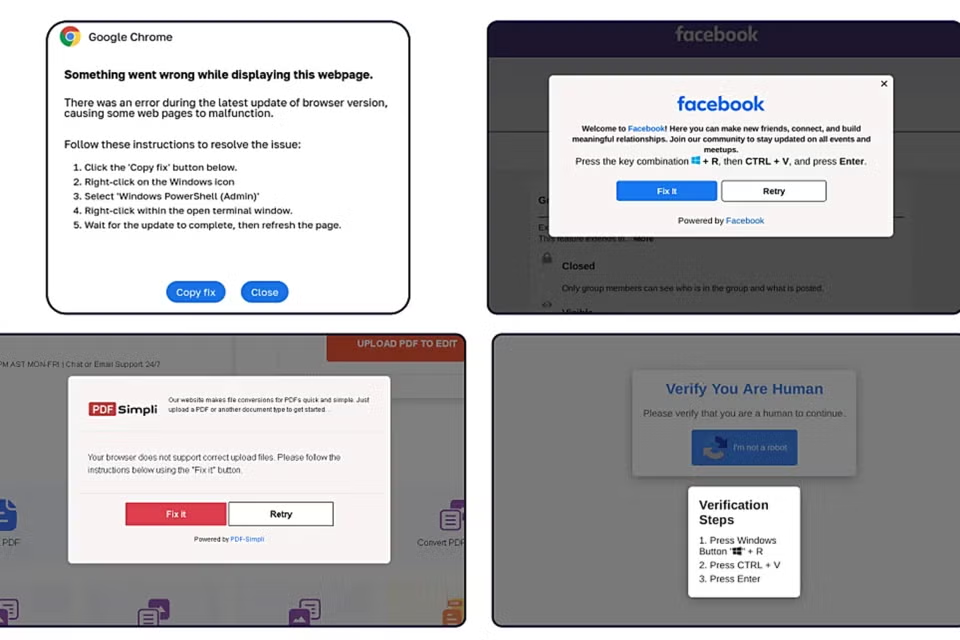
Instead, a fake error message or fake verification screen shows up, usually on a compromised website or through a deceptive ad. It tells the person something needs fixing or something needs verifying. Then it walks them through three steps: copy a short piece of text, open a specific program on their device, and paste.
That’s it. That’s the entire attack. The person does all the work. The scam simply talks them into it.
Security researchers first documented this technique in early 2024. Since then, it has become one of the most common ways attackers get into a business, precisely because it sidesteps the security habits most people have already learned. Your team has been trained to distrust email attachments and suspicious links. They have not been trained to distrust a popup that sounds like it’s trying to help them.
How does the scam actually work, step by step?
Picture a normal afternoon. Someone on your team is searching for a document template, checking a delivery status, or joining a video call. A page loads that looks like a routine browser error or a human verification check, similar to the “I’m not a robot” boxes people see constantly.
The message tells them to do one of three things:
- Press two keys together to open the Windows Run box, then paste a line of text and press enter
- Open PowerShell, a built-in Windows tool, and paste a command
- Open the Terminal on a Mac and paste a command
None of these tools are unusual or suspicious on their own. Your technology team uses them every day. That’s exactly why this scam works. The person isn’t being asked to install something strange. They’re being asked to use a tool that’s already sitting on their device, in a way that feels like following simple instructions.
The text they paste isn’t what it appears to be. It’s a command that reaches out to a server controlled by the attacker, pulls down malicious code, and runs it, often without saving anything to disk that a scan would catch later. Within seconds, the attacker can have a foothold on that device.
Here’s what makes it so convincing in the moment. The popup usually includes a short countdown or a “click to copy” button, so the person never has to read or understand the text they’re pasting. They just follow numbered steps, the same way they’d follow instructions from a real support article. There’s no reason for someone unfamiliar with the scam to pause, because every step feels like the kind of small troubleshooting task people handle on their own several times a week.
Why does this get past security software that’s supposed to catch it?
Security software is very good at catching malicious files. It watches downloads, scans attachments, and flags known bad programs. A ClickFix attack doesn’t behave like any of that. The person didn’t download a file. They typed nothing themselves. They followed instructions and pasted text into a legitimate system tool, using their own keyboard, under their own login. From the system’s point of view, that looks like a normal person doing normal work.
Some newer versions of the scam skip the Run box entirely and use the Windows Power User menu or File Explorer instead, specifically to dodge security tools that were built to watch for the Run box. Attackers are actively testing new doorways as the old ones get watched more closely.
This is exactly why layered protection matters. Endpoint detection, network monitoring, and least-privilege account setups all raise the odds of catching the attack even after someone pastes the command. But no piece of software can be the only line of defense against a scam that’s designed to look like a normal task. A trained team member who pauses and asks a question is still the strongest control we have.
What does one of these popups actually look like?
They’re built to blend in, and they borrow the visual language of things your team already trusts. Common versions our team has tracked include:
- A fake browser update screen that mimics the real thing almost exactly, complete with a progress bar and “working on updates” message
- A fake human verification check, similar to a CAPTCHA, that claims it can’t confirm you’re human until you follow a few steps
- A fake video conferencing error, made to look like Google Meet or a similar tool, claiming your microphone or camera isn’t working correctly
- A fake document or file viewer error claiming a plugin or extension is missing
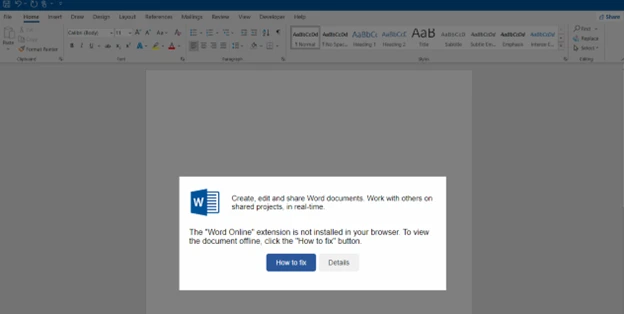
What they all have in common: a manufactured problem, a promise that following a few short steps will fix it, and a request to copy, open a tool, and paste. Once your team can spot that pattern, the specific disguise stops mattering.
Why is this happening more right now?
A few things are driving the increase our team has observed over the last two months.
First, it works. Attackers go where the success rate is highest, and this technique has proven effective across Windows, Mac, and even Linux systems, which means one scam template can target almost any business.
Second, it’s cheap and scalable for the criminals running it. A single fake webpage, seeded through search results, malicious ads, or compromised websites, can reach thousands of people with no custom targeting required.
Third, the payloads on the other end have gotten more valuable to steal. Recent waves have delivered credential-stealing programs aimed at browser passwords, saved logins, and even cryptocurrency wallets, which means a single successful attempt can hand over far more than one login.
None of this means your business is being personally targeted. It means the net is wide, and any business with people using the internet during a normal workday is inside it.
One widely cited 2025 industry threat report credited this single technique with more than half of all malware delivered through this style of attack that year. That’s not a niche scam anymore. It’s become one of the default playbooks criminals reach for first, precisely because it doesn’t need a skilled hacker on the other end, just a convincing popup and a person willing to help fix their own “problem.”
Could this actually happen to a business like yours?
Yes, and it doesn’t require anything unusual on your team’s part. We’ve watched this play out at growing businesses across the Southeast that have nothing in common except that someone was doing ordinary work online.
A common scenario looks like this: an office manager is searching for a shipping update or a vendor’s contact page. A popup appears claiming the page can’t display correctly and offering a one-click fix. She’s busy, the message looks routine, and she follows the steps because it seems faster than stopping to ask someone. That single decision, made in good faith and under normal time pressure, is the entire attack surface a ClickFix scam needs.
This is also why we build client environments around more than one layer of defense. A team that’s trained to spot this pattern is the first line. Endpoint monitoring that flags unusual command activity is the second. Least-privilege account setups that limit what any one login can reach if it’s compromised are the third. No single layer catches everything on its own, but together they’ve held against every attempt we’ve tracked so far.
What should your team actually do if they see one of these popups?
This is the one message worth repeating until it becomes muscle memory: nothing legitimate will ever ask you to open the Run box, PowerShell, or Terminal and paste something to fix a problem or prove you’re human.
Not a browser update. Not a video call. Not a document viewer. Not a security check. If a popup gives instructions that involve copying text, opening a system tool, and pasting, the safe response is to close the page and reach out to your technology team, every single time, with no exceptions for how official it looks.
A few habits make this stick across a whole team:
- Teach the pattern, not just the example. The specific fake screen will keep changing. The instruction to copy, open a tool, and paste will not.
- Make reporting easy and blame-free. If someone almost fell for it or already pasted something, the fastest report gets the fastest response. Nobody should hesitate out of embarrassment.
- Treat the Run box and Terminal as tools for your technology team, not for troubleshooting on your own. If a system genuinely needs a fix, that’s what your support desk is for.
- Repeat the message more than once. One email is easy to miss. A newsletter mention, a quick team meeting note, and a reminder from a manager all reinforce the same habit.
A simple script helps here more than a long policy document does. Something as short as “if it asks you to copy, open a tool, and paste, stop and call us” is easier for a busy team to remember than a detailed explanation of malware delivery methods. The goal isn’t to turn every employee into a security analyst. It’s to give them one clear trigger that tells them to pause and ask.
This is the same principle behind the playbook we build into every client engagement. Security awareness works best as an ongoing habit, not a once-a-year training video that gets watched and forgotten. A short, specific warning delivered while the threat is actively rising, like this one, tends to stick far better than a generic annual refresher ever does.
What if someone already pasted the command?
If this happens, speed matters more than anything else. Disconnect the device from the network immediately, whether that means unplugging the cable or turning off Wi-Fi, and contact your technology support team right away. Don’t wait to see if anything looks wrong first. Many of these payloads run quietly in memory with no visible symptoms while they collect passwords and account access in the background.
The single biggest mistake we see is delay caused by uncertainty. A team member isn’t sure if what they did was actually a problem, so they wait to mention it. Every minute of that wait gives the attacker more time to move. A culture where people report fast and without fear closes that gap.
What is STG doing to protect against this?
Good news: The ProSafeIT security stack has correctly caught and mitigated every ClickFix attempt we’ve identified across our client base so far. That protection includes endpoint monitoring that watches for suspicious command execution, not just suspicious files, along with the account and network controls we build into every client environment.
We’re also using this moment to get ahead of the trend instead of reacting to it. That means direct communication like this piece, updated awareness training that includes this specific scam pattern, and continued monitoring as attackers test new variations. Attackers change the disguise every few months, so this is not a one-time warning we file away. Expect to see the pattern reinforced again as it evolves.
If your team hasn’t been through security awareness training in the last year, or if you’re not confident everyone would recognize this pattern today, that’s a conversation worth having with us directly.
The one rule to remember
If a popup on a website ever tells you to copy something, open the Run box or a Terminal, and paste it in, stop. Close the page. Give us a call or email.
That single habit, repeated across every person on your team, is the strongest protection against this scam that exists today, stronger than any piece of security software running quietly in the background. It costs nothing to teach, it takes seconds to remember, and it works regardless of which disguise the popup happens to be wearing this month.
The attackers are betting that your team will treat a friendly looking popup the same way they treat a real request for help. The businesses that come out ahead of this trend are the ones that make one simple habit automatic before that bet ever gets tested.
Worried about whether your team would catch this? Reach out to your Technology Advisor and let’s talk about where your current training and protection stand.
Sources referenced:
https://www.huntress.com/blog/dont-sweat-clickfix-techniques
https://www.hhs.gov/sites/default/files/clickfix-attacks-sector-alert-tlpclear.pdf